Ride Safe.
Ride Smart.
Kathmandu's roads are unpredictable. Here's everything you need to know about riding a Zum cycle safely, following the rules, handling traffic correctly, and keeping yourself and everyone around you out of harm's way.
Check the cycle. Every single time.
The Zum app shows you battery percentage and estimated range before you start. That thirty seconds of checking will save you from a dead battery mid-ride or a mechanical problem you could have spotted at the station.
When you arrive at a station, always pick the one with the highest range. More range means fewer surprises, especially on longer trips or routes with uphill stretches. Once you scan the QR, the app shows you battery percentage and estimated range before you confirm the ride, so you know exactly what you're getting into.
When the cycle's battery drops to 30%, Zum sends you a push notification and motor assist gradually starts to reduce. At that point, head to the nearest Zum station to swap onto a fully charged cycle. If you can't get to a station easily, you can also request a battery swap using 1 token — a Zum team member will bring a fresh battery to where you are so your ride continues without losing time.
Both disc brakes should engage smoothly. Pull each lever gently before pushing off. If a brake feels loose or pulls all the way to the handlebar without resistance, don't ride that cycle. Report it through Help and Support and pick a different one.
Every Zum cycle has a handlebar-mounted phone holder. Put your phone in it before you start — it keeps your screen visible so you can glance at your balance, map, and alerts without picking your phone up mid-ride.
Your remaining minutes are on the home screen. If you're below 10 minutes and planning a longer trip, top up before unlocking. It's easier to handle this before you leave the station.
One rider. One cycle.
These rules are for your safety, the other people around you and the people behind you on the same road.
No passengers
Do not carry a second person on the cycle — not on the frame, not on the basket, not holding onto you from behind. The cycle is not built for it and the braking distance changes significantly with extra weight.
Don't overload the basket
The front basket is for light personal items — a bag, a small parcel. Heavy loads shift the centre of gravity forward and make the cycle harder to steer and brake.
16 and above with valid ID
To ride a Zum cycle you must be 16 or older and carry a valid ID. Anyone under 16 is not permitted to ride a Zum cycle.
No phone in hand while riding
Your phone goes in the handlebar holder. If you need to interact with the app, pull over first. Riding with a phone in your hand affects your reaction time and is a common cause of falls.
No earbuds while riding
Do not use earbuds, earphones, or headphones of any kind while riding. You need both ears completely free to hear horns, approaching vehicles, and pedestrians.
No heavy or hazardous items
Water jars, gas cylinders, and other heavy or bulky items are not permitted on the cycle. They shift the centre of gravity, make the cycle harder to steer and brake, and create a real risk to you and everyone around you.
The speed rules. Actual ones.
Zum cycles are capped at 25 km/h on throttle. Real-world average speed on Kathmandu roads sits between 16–21 km/h. Here's why that cap matters and what the system does when it spots you pushing past it.
| Situation | Expected Speed | Status |
|---|---|---|
| Normal city riding | 16 – 21 km/h | ✓ Normal |
| Throttle max | 25 km/h | ✓ Allowed |
| Downhill without braking | 25 km/h+ | ⚠ Monitored |
| Repeated overspeeding | Reported to system | ✗ Restricted |
Ride speeds are tracked throughout every session. The cycle may enjoy a downhill slope, but the system won't pretend not to notice. Frequent overspeeding beyond expected limits gets reported, and repeated violations can lead to restrictions on your account.
Navigating Kathmandu traffic on a cycle.
Kathmandu roads were not designed for smooth cycling. Narrow lanes, unpredictable traffic, heavy pedestrian crossings, and potholes that appear overnight. Here is how to move through all of it without becoming a hazard to yourself or anyone around you.
Ride left, stay left
Keep to the left side of the lane at all times. Do not drift toward the centre or into oncoming traffic lanes, even when the road looks clear ahead.
Pedestrians have priority
On narrow lanes, near zebra crossings, and at any point where pedestrians are crossing — yield. Slow down, don't swerve around them.
Use the horn
Zum cycles have a built-in electric horn. Use it at blind corners, tight alleys, before overtaking, and anywhere someone might not see or hear you coming.
Watch for road hazards
Potholes, broken edges, sand patches, and speed bumps. Slow down before obstacles. Braking at speed on loose road is far more dangerous than slowing early.
Obey traffic lights
Red means stop. Even when motorbikes around you don't. Your cycle is slower to accelerate and far less protected. Cross only on green with a clear road ahead.
Adjust for wet roads
After rain, stopping distances increase significantly. Leave more space in front of you and brake earlier than you think you need to. Wet metal surfaces near drains are especially slippery.
Footpaths — the rule and what you can do
Riding on footpaths is not allowed. Even when traffic is stopped or the road feels impossible, the footpath is for pedestrians. However, if you need to get somewhere via a footpath, you can dismount and walk the cycle alongside you.
Intersections
Most serious cycle incidents happen at intersections. Slow down well before you reach one. Look left and right even on a green. Large vehicles like buses and trucks have wide blind spots and may not see you.
Overtaking
Overtake only on the right, and only when you have clear space and a clear line of sight ahead. Check behind you first. Signal with your right arm. Don't overtake at intersections, pedestrian crossings, or on narrow lanes.
Following distance
Leave at least two to three metres between you and the vehicle or cycle in front. On wet roads, double that. Sudden stops happen from potholes, pedestrians stepping out, doors opening.
Roundabouts and Ring Road crossings
Zum operates within Kathmandu's Ring Road. If your route brings you close to a roundabout or Ring Road crossing, the app will alert you before you reach the boundary. Pay attention to the geofence.
Signal before you move. Every time.
Use hand signals to let other road users know where you are going. Give the signal clearly and early, at least three seconds before you turn or slow, so the vehicles behind you have time to react.
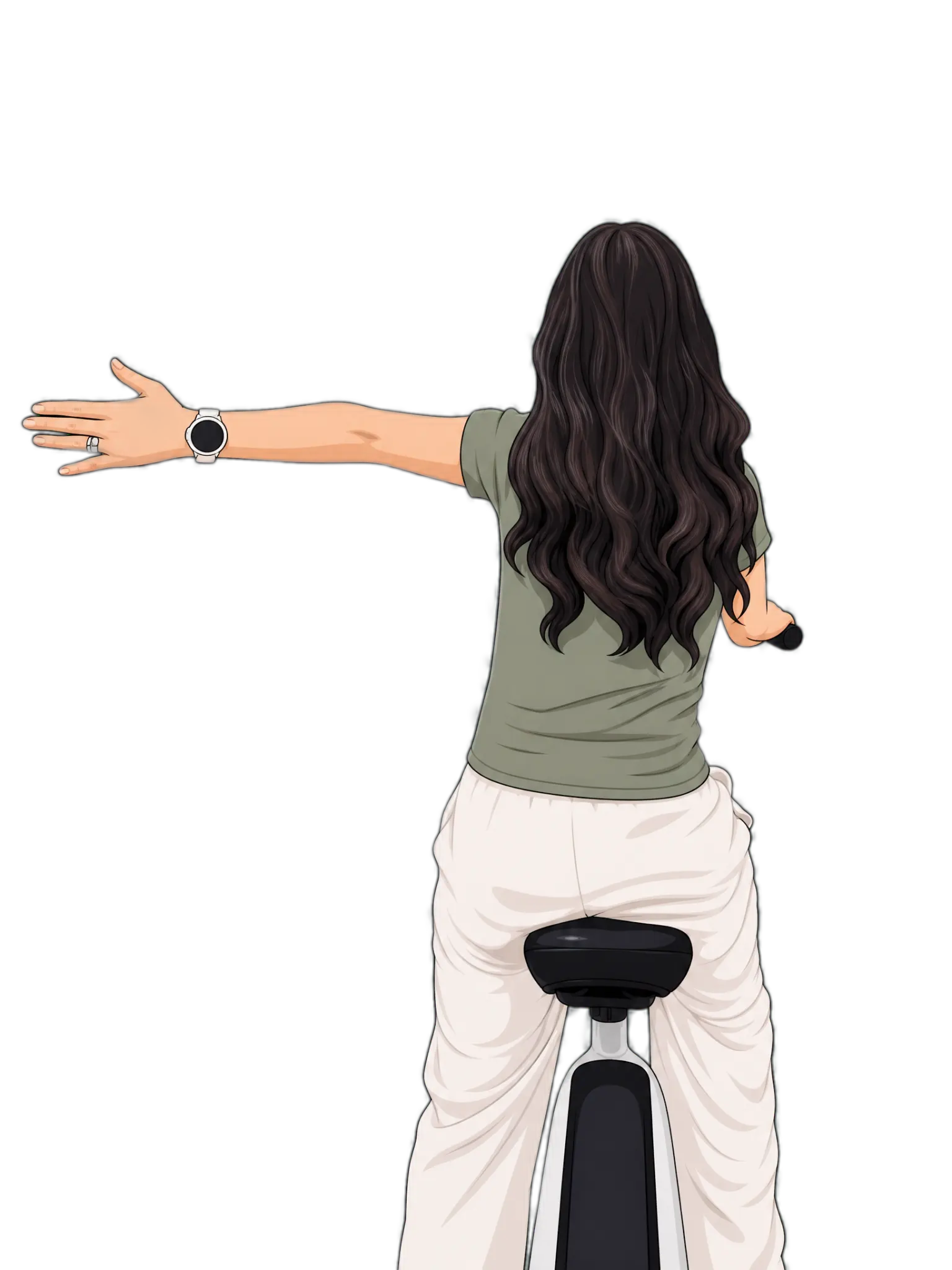
Extend your left arm straight out to the left, parallel to the road. Keep your right hand on the handlebar. Hold the signal until you begin the turn.
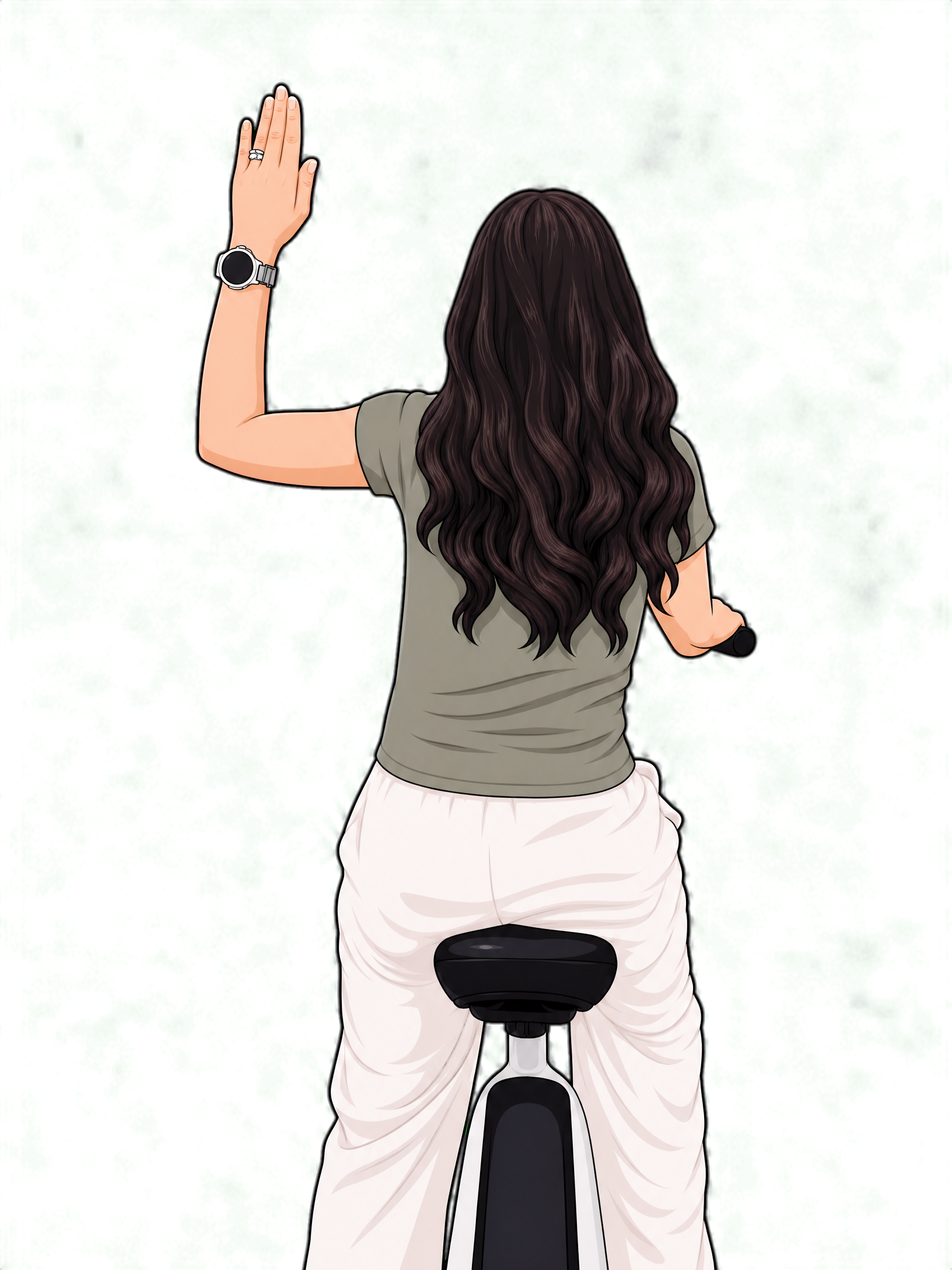
Raise your left arm straight up, palm open and facing forward. Keep your right hand on the handlebar.
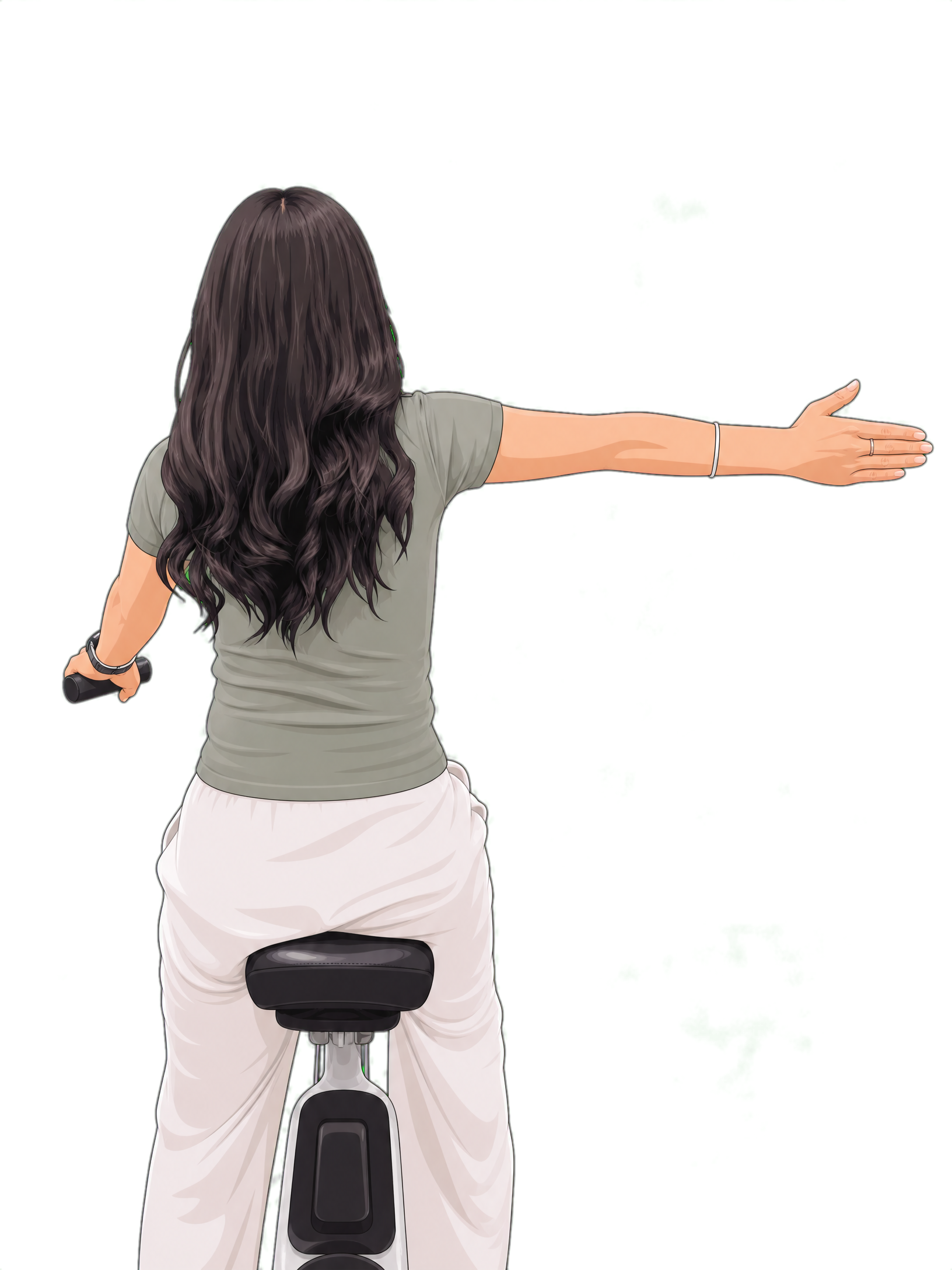
Extend your right arm straight out to the right. Keep your left hand on the handlebar. More widely used and easier to hold on uneven roads.
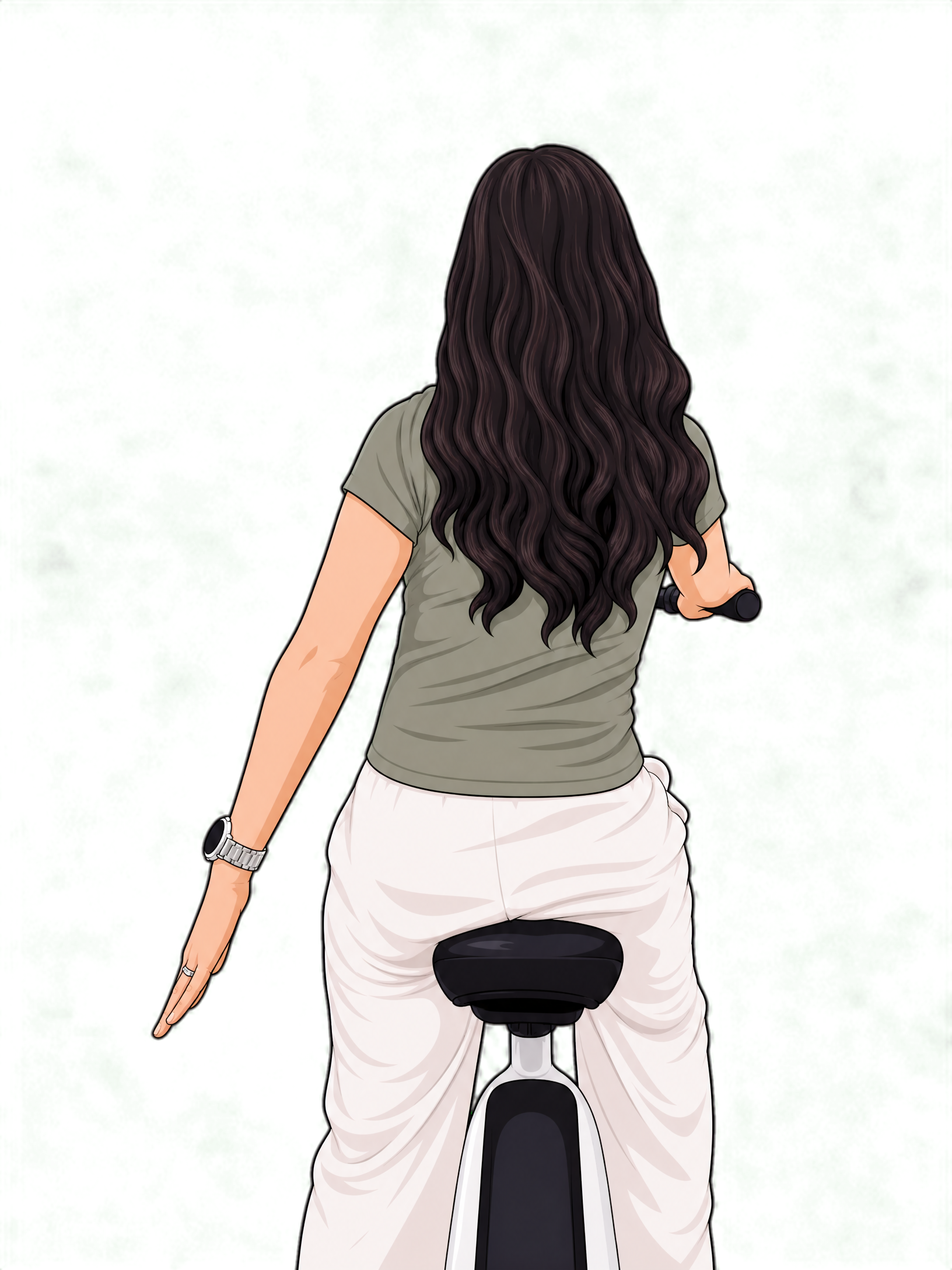
Extend your left arm straight down alongside your body, palm facing back. Tells vehicles behind you that you are decelerating.
After dark. Stay visible.
Zum cycles come equipped with LED headlamps — they're there for a reason. Turn them on when visibility drops, not just after full dark. Dusk, overcast days, tunnels, and shaded roads all count.
Use the headlamp
Switch on the LED headlamp at dusk and any time visibility is reduced. It's not just so you can see — it's so other road users can see you approaching.
Slow down in the dark
At night, you have less time to react to what the light reveals ahead. Reduce your speed — especially on roads you don't know well, and anywhere there's likely to be pedestrians.
Plan around 10 PM
All cycles are locked at 9:30 PM and active rides need to be completed and put in a station by 10 PM. All cycles will be locked at 10:00 PM.
Tokens. What they are and when they get used.
Tokens are a separate balance used for specific actions outside a regular ride. One token costs Rs. 100 and they never expire. Buy them from the Token Center on the home screen by tapping Token +.
End ride outside a station
No Zum station nearby? You can park and end your ride remotely. Park the cycle upright away from roads and walkways, take a clear photo, and submit it through the app. Available until 9:30 PM only.
Swap battery mid-ride
Running low on battery and can't reach a station? Use 1 token to request a battery swap. A Zum team member will bring a fresh battery to wherever you are.
Bring a cycle to you
Can't get to a station? Request a cycle delivery anywhere inside the Ring Road. A Zum team member will bring a cycle directly to your location.
Boundary penalties use tokens too
Crossing the geofence doesn't just cut the motor — it charges tokens. The inner boundary gives you a 5-minute grace period to return; the outer boundary charges immediately with no warning. Both cost 2 tokens on first crossing, then 2 more every 5 minutes after that if you stay outside.
Where and how you park matters.
How you end your ride directly affects the next rider and the neighbourhood around the station. Good parking keeps the system running and keeps areas around stations clear.
Scan the QR code on the station screen to close your ride. This is always free. If a docking slot is available, push the cycle in firmly until it clicks. A docked cycle charges automatically.
Before ending remotely, place the cycle well. Upright, wheels on solid ground, away from the road, not blocking gates, building entrances, shop doorways, footpaths, or anywhere that creates an obstruction.
The photo needs to show the full cycle, its upright position, and the surroundings clearly enough for the Zum team to confirm the parking is acceptable. This costs 1 token and is charged on approval.
Your ride time only stops after the Zum team approves the photo. Until then, the timer continues. Submit a clean photo straight away so the review is quick.
Stay inside. Here's what happens if you don't.
The ride zone covers everything inside Kathmandu's Ring Road. The map always shows your exact position relative to the boundary. Two zones, two different levels of consequence.
| Boundary | Warning | What Happens | Cost |
|---|---|---|---|
| ⚠ Inner | Beep + app alert | 5-min grace period. Return in time: no charge. Stay out: motor and pedal assist cut. | 2 tokens after grace, +2 every 5 min |
| ✗ Outer | None | Instant penalty. No grace period. Motor and pedal assist cut immediately on crossing. | 2 tokens immediately, +2 every 5 min |
If something goes wrong.
Zum has a built-in SOS feature available from the active ride screen and from the mid-ride menu. One tap sends your live location and your cycle's location to the Zum support team, who will contact the police if needed. Your registered emergency contact is also notified immediately.
If the cycle locks unexpectedly
This can happen when your minute balance reaches zero, when you cross the geofence boundary, or when the system detects unusual activity. Check the app notification for the reason. Support is available 10 AM to 5 PM.
If you're involved in a road incident
Pull over and stop the cycle safely. Use SOS if you need emergency help. If it's a minor incident with another road user, note the vehicle details and contact the Zum team through Help and Support. Don't leave the cycle unattended mid-road.
Quick reference — safety & rules
- Pick highest-range cycle at station
- Check brakes before every ride
- Go to station or swap at 30% battery
- One rider only, no passengers
- No overloading the basket
- Ride left, stay left
- Max throttle speed: 25 km/h
- Use the horn at blind corners
- Left arm out = turn left
- No riding on footpaths (walk ok)
- Keep two-metre following distance
- Obey traffic lights, stop on red
- Slow down at intersections
- Use LED headlamp after dusk
- No earbuds — keep both ears free
- Know your token balance
- Dock the cycle if slot is available
- Don't block entrances when parking
- End ride at station before 10 PM
- Use SOS only in real emergencies
That covers it. Safe riding isn't complicated: it's mostly attention and a few habits that become automatic after your first few rides. The app, the cycle, and the system are all set up to keep you informed and within bounds. The rest is on you.